How to Top Up Your RDN (Customer Fund Account) on Pluang
This document provides detailed instructions on how to top up your RDN on Pluang, including prerequisites, steps, and related FAQs.
12 Steps
Q: How do I top up my RDN on Pluang?
A: You can top up your RDN on Pluang in 5–30 minutes via the Balance page in the app. Funds from your bank account will be transferred to your RDN and will be ready to use for stock purchases once confirmed.
Before you start, make sure:
- You have successfully completed Indonesian Asset Verification and your RDN is active
- Your bank account has sufficient balance
- The bank account used is under your own name
Steps:
- Open the Balance page
From the Pluang app homepage, tap IDR, then select the RDN wallet
- Tap Top Up in the RDN wallet
- Choose a payment method
Select from available methods: bank transfer or ATM transfer
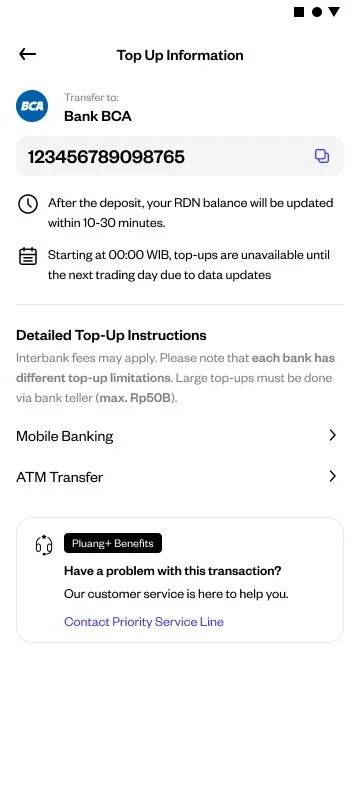
- Follow the payment instructions
Complete the transfer according to the instructions displayed on the screen based on your chosen method
Success indicator:
Your RDN balance will increase according to the top-up amount. You will receive a notification in the app and via email confirming the successful top-up. The funds can be used immediately to buy stocks.
Things to note:
- Top-ups can only be made during IDX trading hours (Monday–Friday, 09:00–15:00 WIB)
- If the balance has not been credited after some time, contact Pluang Customer Support and provide proof of transfer
Related Mini Q&A:
Q: What is the minimum top-up amount for RDN on Pluang?
A: There is no minimum or maximum top-up limit for RDN on Pluang.
Q: How long does it take for top-up funds to be credited?
A: The RDN balance will be updated within 5–30 minutes after top-up.
Q: Are there any fees for topping up RDN on Pluang?
A: Pluang does not charge any top-up fees, but your bank may apply transfer fees.
Q: Which banks can be used to top up RDN?
A: You can use any bank that supports interbank transfers.
Q: Can I withdraw my RDN balance back to my bank account?
A: Yes, you can withdraw your RDN balance to your bank account through the Wallet page in the Pluang app.