How do I exercise my rights on Pluang?
You can exercise your rights on Pluang in about 2–3 minutes via the Portfolio page banner or the Corporate Action ADP screen. The result is new shares credited to your Indonesian Stocks portfolio once processing completes (up to 3 days).
Before you start, make sure:
-
You hold a rights ticker (suffix "-R", e.g. BBCA-R) in your Indonesian Stocks portfolio
-
You're acting within the exercise period, in Session 1 (TN market: 09:00–12:00 WIB Mon–Thu, 09:00–11:30 WIB Fri) — rights exercise does not process in Session 2
-
Your RDN balance covers the full exercise cost (Exercise Price × Lots Exercised × 100 shares/lot)
6 Steps
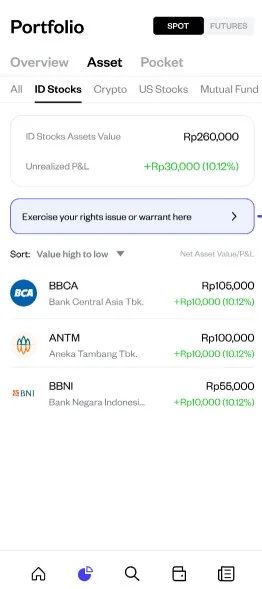
Open the Portfolio page
Look for the banner "Exercise your rights issues or warrant here" — it appears automatically when you hold a -R ticker. Alternatively, open the stock's Corporate Action ADP screen directly from the asset detail page.
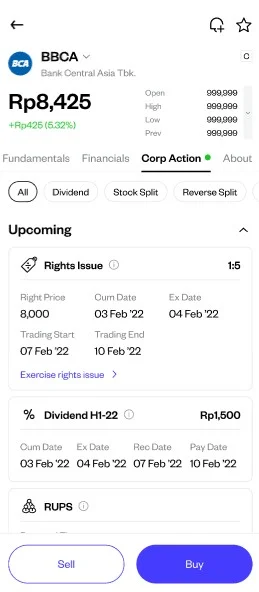
Tap the banner or Corporate Action entry
This opens the vault/exercise screen for your rights holding.
Review the Exercise Price and Available Lot
These are fixed by the issuer and shown on screen before you enter anything.
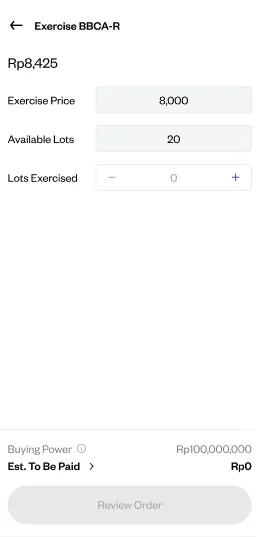
Enter the number of Lots Exercised
You can exercise up to your full Available Lot, or fewer (partial exercise is supported) — but never more than the Available Lot shown.
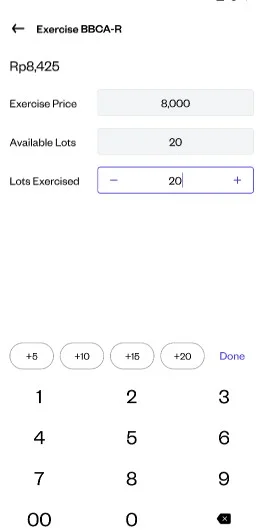
Confirm your RDN balance covers the cost
The app checks Exercise Price × Lots Exercised × 100 shares/lot against your RDN balance at submission. Top up first if needed.
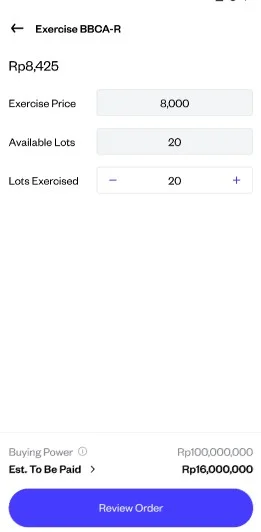
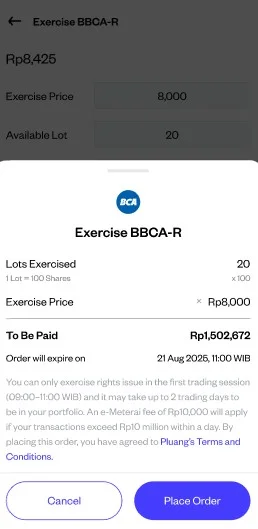
Review the order summary, then Confirm
⚠️ This step is final — once submitted, an exercise request cannot be cancelled.