How do I top up Pluang using a Virtual Account?
You can top up your Pluang Wallet using a Virtual Account (VA) from BCA, BRI, or Mandiri via Home → Wallet → Top Up → Choose Bank BCA/BRI/Mandiri. Check the VA number shown in the app, then transfer to it from your mobile banking app, internet banking, or an ATM — your balance updates once the bank confirms the payment.
Before you start, make sure:
- You're logged in to the Pluang app
- You've completed Basic Verification
- You have a bank account registered in your own name — the destination VA must match the name registered on your Pluang account
Steps:
8 Steps
Open the Pluang app and tap "Wallet".
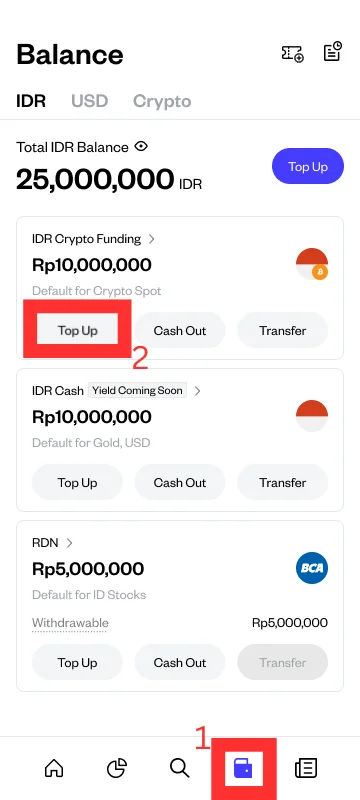
To top up via Virtual Account, you must select “IDR Crypto Balance / IDR Crypto Funding” and tap “Top Up”.
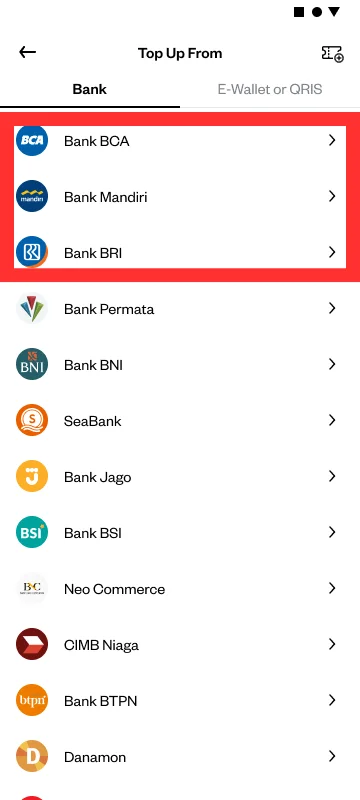
Select your bank that supports Pluang Virtual Account top-ups (BCA, BRI, or Mandiri).
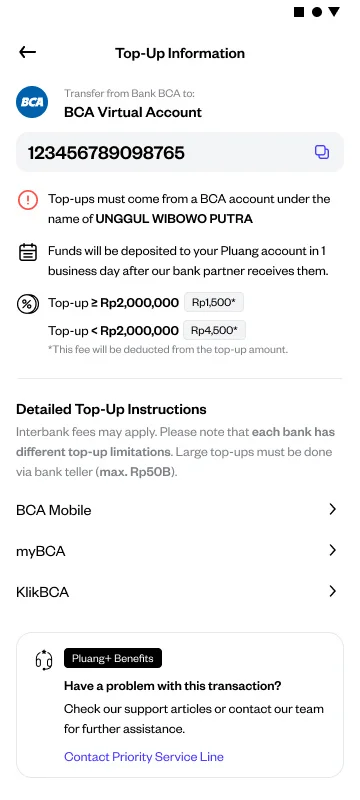
Note the Virtual Account number shown on screen. VA numbers can change without prior notice, so always use the number currently displayed — don't reuse a number saved from a previous top-up.
Open your mobile banking app, internet banking, or an ATM. Use the same bank account you'll be transferring from — it must be registered in your own name.
Transfer to the Virtual Account number. Select Transfer to Virtual Account (or equivalent) in your banking app, then enter the VA number exactly as shown.
Enter the amount and confirm Enter your top-up amount (minimum Rp10,000, before fees), then confirm the transaction with your bank.
You'll know it worked when: Your IDR Cash Wallet balance increases and a "Top Up" entry appears in the History menu of the Pluang app. Top-ups are processed in real time — if your balance hasn't updated after a successful transfer, allow up to 24 hours before reaching out to Pluang Care.