How do I partially close a Crypto Futures position on the Pluang app?
Open your position, tap "Close Position," set how much you want to close, and confirm — the closing quantity starts at 100%, so you only change it if you want to close part of the position rather than all of it.
Before you start, make sure:
- You have an open Crypto Futures position on Pluang
10 Steps
Open the Futures Detail Page for your contract, or open the Trade Page and go to the Positions section. Both use the same Close Position sheet, so the steps below are identical either way.
Find the "Your Position" card, which shows your position's Margin, P&L, Quantity, Maintenance Margin, Margin Ratio, Entry Price, Mark Price, and Liquidation Price, along with your margin mode, leverage, and side (Long or Short)
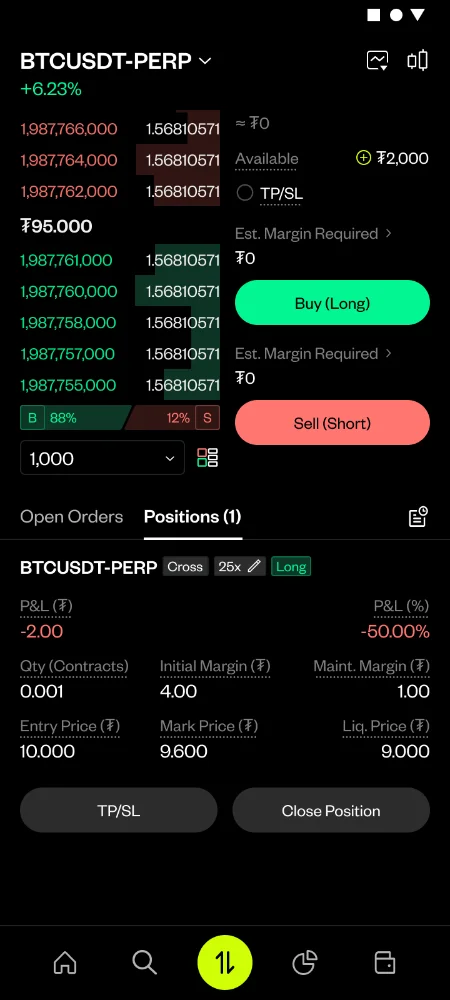
Tap "Close Position" — the button sits next to "TP/SL" at the bottom of the position card.
Check the reference details at the top of the Close Position sheet: Entry Price, Mark Price, and Position Quantity. These are read-only and are there so you can sanity-check your close against your actual position.
Choose your order type. Leave the "Limit Order" option next to the Price field switched off to close at market — the Price field then just shows the current Mark Price for reference. Switch "Limit Order" on to close at a price you choose, and enter that price in the Price field; a limit price is required before you can continue.
Set the quantity to close. The Quantity field defaults to 100% of your position, so you can leave it alone for a full close. To close only part of it, type an amount, tap the − / + stepper (each tap moves the quantity by one minimum contract step), or drag the percentage slider, which has marks at 0%, 25%, 50%, 75%, and 100%. All three controls stay in sync, and the quantity always rounds down to a valid contract multiple
- Review the Estimated P&L shown below the slider — it updates live as you change the quantity, and excludes taxes and fees.
- Tap "Review Order."
Tap "Review Order."
Check the review screen, which is headed with your contract and close type (for example, "BTCUSDT-PERP Market Close" or "BTCUSDT-PERP Limit Close") plus your position side. It lists your Market Price or Limit Price, Quantity, Position Size, Taxes & Fees, and Est. P&L
Tap "Place Order" to submit